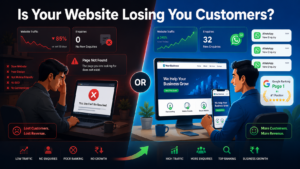

A business website losing customers is more common than most Indian business owners realise, and the worst part is, it happens silently, every single day.
You built a website. You paid for it, launched it, and moved on, assuming the enquiries would come. But they have not. Or visitors arrive and disappear within seconds. Or they call your competitor instead of you, even though your service is genuinely better.
Here is what most business owners do not realise: a bad website does not just fail to attract customers, it actively drives them away. Every day your website has the wrong structure, the wrong speed, or the wrong message, you are losing real enquiries to competitors who got these basics right.
The frustrating part? Most of these problems are completely fixable. They do not require a full rebuild. They do not require a massive budget. They require knowing exactly what to look for and what to do about it.
By the end of this article, you will have a clear, specific checklist of the 10 most common ways a business website loses customers and the exact fix for each one. No generic advice. No vague tips. Just a complete, honest picture so you can identify what is failing and act on it immediately.
Why a Business Website Losing Customers Is More Costly Than You Think
Before the checklist one foundational point is worth locking in.
Your website works 24 hours a day, 7 days a week, 365 days a year. It talks to potential customers while you sleep, while you are on a call with another client, while you are on holiday. No salary. No sick days. No performance inconsistency.
But unlike a human salesperson, your website cannot read the room. It cannot sense hesitation, ask a follow-up question, or recover from a weak first impression. It has one job: give the visitor enough confidence, clarity, and reason to contact you before they close the tab and go to your competitor.
A business website losing customers is not always obvious from the outside, but the data inside your analytics tells the real story. When it does this job well, it is your single highest-performing marketing asset. When it does this job poorly, it is silently costing you revenue every single day.
Here are the 10 signs it is doing the job poorly right now.
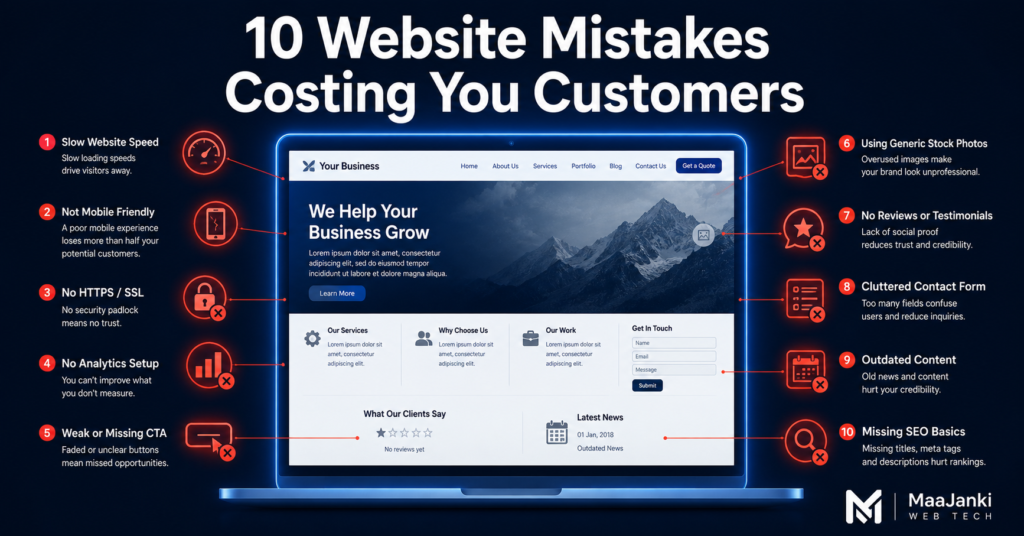
Sign 1: Your Website Takes More Than 3 Seconds to Load
Slow load speed is the single most damaging reason a business website loses customers in India in 2026 — and it is entirely preventable.
Google’s Core Web Vitals data confirms that 53% of mobile users abandon a site that takes longer than 3 seconds to load. On Indian mobile networks, where a significant portion of website traffic arrives, this number is even higher.
The damage is twofold. First, you lose the visitor immediately when they leave before seeing a single word of your content. Second, Google penalises slow websites in search rankings, meaning fewer people find you in the first place.
How to Check It:
Go to PageSpeed Insights and enter your website URL. Google gives you a score from 0 to 100. A score below 50 on mobile is critical. A score below 70 needs urgent attention.
How to Fix It:
- Compress all images using WebP format — uncompressed images are the number one cause of slow websites
- Switch to a fast hosting provider — shared hosting at ₹99 per month cannot handle even moderate traffic efficiently
- Use a caching plugin on WordPress — WP Rocket or W3 Total Cache are both reliable options
- Remove unnecessary plugins — every extra plugin adds measurable load time
- Enable Cloudflare CDN on the free tier — it makes a significant difference for Indian visitors on mobile networks
Target: LCP (Largest Contentful Paint) under 2.5 seconds. This is the Core Web Vitals threshold Google uses to classify a page as fast enough to rank well.
Sign 2: Your Website Looks Broken on Mobile
In India, over 78% of all internet browsing happens on mobile devices. If your website is not fully responsive, meaning it adapts cleanly to every screen size, you are delivering a broken experience to nearly 8 out of 10 visitors.
Broken on mobile means: text that overflows the screen, buttons too small to tap accurately, images that do not resize, forms that are impossible to complete on a small screen, and menus that cover the entire page.
How to Check It:
Open your website on your phone right now. Scroll through every page. Try to tap every button and fill in every form. Then ask someone else to do the same on a different device. Any friction, any element that does not work smoothly, any moment where the visitor would give up, that is where your business website is losing customers.
How to Fix It:
- If your website is on WordPress, switch to a mobile-first theme — Astra, Kadence, or GeneratePress are all reliable options
- Test using Google’s Mobile-Friendly Test tool — it gives a clear pass or fail
- Ensure all CTA buttons are at a minimum of 44×44 pixels in tap target size
- Remove full-screen pop-ups on mobile — Google penalises these in rankings and users close them instantly
This is not optional in 2026. A non-mobile-friendly website is the digital equivalent of a shop with a broken front door.
Sign 3: Your Homepage Does Not Tell Visitors What You Do Within 5 Seconds
When someone lands on your website for the first time, they have one immediate, unconscious question: “Is this for me?”
If your homepage cannot answer that question within 5 seconds through a clear headline, a brief description, and an obvious next step, the visitor leaves. This is called the “5-second test”, and it is one of the most reliable predictors of whether a website converts or not.
This clarity problem is one of the most overlooked causes of a business website losing customers because the business owner sees a beautiful design, while the visitor sees a confusing page with no clear purpose.
The most common homepage mistake seen across Indian business websites is a visually appealing design paired with a completely vague headline. Something like: “Welcome to ABC Enterprises Your Trusted Partner in Excellence.” That sentence tells the visitor nothing. What do you do? Who is it for? Why should they stay?
How to Fix It:
Rewrite your homepage headline using this formula:
“We help [specific audience] achieve [specific result] through [your specific service].”
Examples:
- “We help Delhi restaurants get found on Google and turn searchers into reservations.”
- “Affordable WordPress websites for Indian small businesses ready in 10 days.”
- “We help Bihar-based retailers sell online with professional WooCommerce stores.”
Specific. Clear. Immediate. That is the standard your homepage headline must meet.
Read More Also: Professional website development for Indian businesses
Sign 4: Your Website Has No Clear Call to Action
A visitor reads your homepage. They are interested. They like what they see. And then nothing. No clear direction. No obvious next step. So they do what every uncertain person does: they leave to “think about it.”
They never come back.
Every page of your website needs one primary call to action a specific, visible instruction telling the visitor exactly what to do next. “Call us.” “Request a free quote.” “WhatsApp us now.” “Book your free audit.” One clear action per page. Not five. Not zero. One.
How to Fix It:
- Place your primary CTA button above the fold — visible without scrolling on both desktop and mobile
- Use action-oriented, specific language: “Get a Free Website Audit” consistently outperforms “Contact Us”
- Make the CTA button a contrasting colour one that does not appear anywhere else on the page
- Repeat the CTA at the end of every service page and every blog post
- For Indian audiences: a WhatsApp CTA button converts exceptionally well it removes the friction of formal email enquiries entirely
One quick test: Ask a stranger to open your website. Give them 10 seconds. Then ask: “What would you do next on this site?” If they cannot answer clearly, your CTA is failing, and your business website is losing customers who were genuinely interested.
Sign 5: Your Website Has Outdated or Thin Content
A website with three pages, placeholder text, and no updates since 2021 sends one clear signal to both visitors and Google: this business is either inactive, unreliable, or not serious about the people it serves.
Google’s Helpful Content System in 2026 actively demotes websites with thin, generic, or outdated content. Visitors draw the same conclusion independently “If they cannot keep their website current, can I trust them to deliver on their promises?”
How to Fix It:
- Audit every page on your website delete or rewrite anything with fewer than 300 words that does not serve a clear purpose
- Update your About page with current information year established, current team, current services, recent achievements
- Add case studies or real client results a single detailed case study adds more trust than ten generic testimonials
- Start a blog and publish a minimum of two articles per month each article creates a new keyword entry point for Google traffic
- Remove any references to pricing, services, or claims that are no longer accurate
Content is not decoration. It is the primary mechanism through which both Google and potential customers evaluate whether your business can be trusted.
Sign 6: Your Website Has No Trust Signals
A visitor who has never heard of your business is making a risk assessment consciously or not. “Is this a real business? Will they deliver what they promise? Is my money safe with them?”
Trust signals are the elements of your website that answer these questions before the visitor even has to ask. Their absence is one of the most silent drivers of a business website losing customers because the visitor simply does not feel confident enough to take action. In fact, missing trust signals are the second-biggest reason a business website loses customers among Indian SMBs second only to slow page speed.
The Trust Signals Your Website Must Have:
- Google reviews or testimonials — with real names, ideally with photos. Not anonymous quotes.
- GST number and business registration details — critical for Indian B2B clients evaluating your legitimacy
- Physical address — even for digital service businesses. A verifiable address signals accountability.
- Real team photos — stock images of smiling foreign professionals are immediately identified as fake and actively damage trust
- Client logos (with permission) — recognisable brands you have worked with provide instant credibility
- Certifications or partnerships — Google Partner status, Meta Business Partner, or relevant industry memberships
- Response time promise — “We respond to all enquiries within 4 business hours” and then actually deliver on it
How to Fix It:
Add a dedicated testimonials section to your homepage. Embed your Google Business Profile reviews directly. Add a client results section with specific numbers and outcomes. These are not vanity elements, they are conversion-critical components of a business website that works.
Read More Also: Digital Marketing Agency: What It Is and Do You Really Need One in 2026
Sign 7: Your Contact Process Has Too Much Friction
You have a visitor who is ready to enquire. They click “Contact Us.” They are met with a 10-field form asking for their name, email, phone, company name, company size, budget range, timeline, message, how they heard about you, and their preferred callback time.
They close the tab.
Every additional field in a contact form reduces submission rate by approximately 11%. A 10-field form is not a contact form it is a barrier. You are qualifying leads before they have even agreed to talk to you.
How to Fix It:
- Reduce your contact form to 3 fields maximum: Name, Phone or Email, and a brief message
- Add a WhatsApp button as the primary contact option for Indian audiences, this is the single highest-converting contact mechanism available
- Place your phone number in the header of every page visible on both desktop and mobile without scrolling
- If you need to qualify leads, do it after the first contact not before
- Add a Google Maps embed on your contact page it reinforces physical legitimacy and improves local SEO simultaneously
The goal of a contact page is one thing: make it effortless for an interested person to reach you. Every element that does not serve that goal directly must be removed.
Sign 8: Your Website Has No SEO Foundation
A website with no search engine optimisation is invisible to the majority of people who are actively looking for exactly what you offer. In India, Google processes over 9 billion searches every day. The businesses appearing at the top of relevant results get the enquiries. The businesses that do not appear regardless of how good their product or service is, are simply not part of the conversation.
This is one of the most preventable ways a business website loses customers before they even discover the business exists.
How to Check If Your SEO Foundation Is Missing:
- Search your business name on Google — does your website appear first?
- Search your core service plus your city — for example, “web design agency Patna” do you appear anywhere on page one?
- View your website source code (Ctrl+U) — do you have a unique title tag and meta description on every page?
- Check Google Search Console — are there crawl errors, indexing issues, or manual actions affecting your visibility?
How to Fix It:
- Install RankMath or Yoast SEO if your website runs on WordPress
- Write a unique, keyword-rich title tag and meta description for every single page
- Ensure every image has a descriptive alt text not “image1.jpg” or “IMG_4821”
- Create and submit a sitemap to Google Search Console
- Set up and fully complete your Google Business Profile this is the single fastest local SEO win available to any Indian business right now
Sign 9: Your Website Does Not Load Securely (No HTTPS)
If your website still runs on HTTP rather than HTTPS, modern browsers — Chrome, Safari, Firefox display a “Not Secure” warning to every visitor before they even see your homepage content. In 2026, where awareness of online fraud is high, that warning ends the visit for a significant proportion of users immediately.
Beyond visitor trust, Google has used HTTPS as a direct ranking signal since 2014. A non-HTTPS website is both penalised in search rankings and rejected by cautious visitors a double penalty that keeps a business website losing customers from both directions simultaneously.
How to Fix It:
This is one of the simplest and cheapest fixes on this entire list. Most hosting providers offer free SSL certificates through Let’s Encrypt. In your cPanel or hosting dashboard, look for “SSL/TLS” installation typically takes under five minutes. If your hosting provider charges extra for SSL in 2026, switch hosting providers. A free SSL certificate is a standard, non-negotiable included service.
Sign 10: Your Website Has No Analytics So You Are Flying Blind
If you do not have Google Analytics or a comparable tracking tool installed, you have no idea:
- How many people visit your website each month
- Which pages they visit — and which ones they abandon immediately
- Where your traffic originates — Google, social media, direct, or referral
- Which devices and cities are your visitors coming from
- What percentage of visitors take action versus the percentage that leaves without doing anything
Without this data, you cannot improve your website methodically. You are making decisions based on instinct alone and instinct without data produces slow, expensive improvements that often fix the wrong problems first.
How to Fix It:
- Install Google Analytics 4 (GA4) — free, and takes approximately 15 minutes to set up correctly
- Install Google Search Console — free, and shows you exactly which search terms bring visitors to your site and which pages Google has indexed
- Connect both tools so that data flows between them
- Review your analytics at a minimum once per week — look for high-bounce pages and high-traffic pages with low conversion rates. These are your highest-priority optimisation targets.
One important benchmark: For a typical Indian service business website, a 3–5% conversion rate enquiries divided by visitors is achievable with a well-optimised website. If your rate is below 1%, multiple problems from this list are almost certainly compounding simultaneously.
How a Business Website Loses Customers at Every Stage The Combined Effect
Here is what most business owners underestimate. Each of these 10 problems reduces your conversion rate independently. But they almost never appear alone.
A business website losing customers through slow speed, missing trust signals, no clear CTA, and zero Google visibility is not losing 10% of potential enquiries. It is losing 70–80%. Every problem compounds the others and the cumulative effect is far greater than the sum of its individual parts.
The good news is that fixing even 3–4 of these issues strategically, in the right order can produce a measurable improvement in enquiries within 30–60 days.
The right order to fix them:
- Speed and mobile — these affect every single visitor the moment they arrive
- HTTPS — a five-minute fix that removes an active trust barrier
- Homepage clarity and CTA — once visitors arrive, give them a reason to stay and act
- Trust signals — build confidence before asking for commitment
- SEO foundation — start bringing the right traffic in consistently
- Analytics — measure what is working so you can double down on it
Is Your Website Costing You Customers Right Now?
The fastest way to find out is a proper website audit where every technical, content, and conversion element is examined against current Google standards and your specific business goals.
If your business website is losing customers, this audit will show you exactly where the breakdown is happening and what to prioritise first. No templates. No generic reports. A real review of your specific website with a clear, prioritised action list.
At MaaJanki Web Tech, we offer a free website audit for Indian businesses that want to know exactly what is failing and exactly what to fix first.
📱 Book your free website audit on WhatsApp: MaaJanki Web Tech
📧 Email us: info@maajankiwebtech.com
🌐 Visit: maajankiwebtech.com
Conclusion
A business website losing customers is not a permanent condition. It is a solvable problem and solving it is one of the highest-ROI actions any Indian business owner can take in 2026.
The 10 problems covered in this article slow load speed, broken mobile experience, unclear homepage messaging, missing CTAs, outdated content, absent trust signals, contact friction, no SEO foundation, missing HTTPS, and zero analytics are all fixable. None of them requires starting over from scratch. None of them requires an unlimited budget.
What they require is knowing which ones are affecting your specific website, prioritising the fixes in the right order, and executing them properly.
Start with your free audit. Know exactly where you stand. Then fix it and watch your enquiry rate change.
FAQ
Q: How do I know if my business website is losing customers?
A: The clearest sign of a business website losing customers is a high bounce rate over 70% in Google Analytics, combined with very few enquiry form submissions despite regular traffic. Additional indicators include not appearing on Google’s first page for your core service keywords, a PageSpeed Insights score below 50 on mobile, and a conversion rate below 1%. If two or more of these apply, your website is actively costing you business right now.
Q: What is the most common reason a business website fails to convert visitors?
A: The single most common conversion killer across Indian small business websites is a lack of homepage clarity visitors cannot determine within 5 seconds what the business does, who it serves, and what to do next. Slow mobile load speed is the second most common issue. These two fixes alone resolve the most common causes of a business website losing customers within 30 days of implementation.
Q: How much does it cost to fix a slow website in India?
A: Many speed improvements are completely free image compression, caching plugins, and Cloudflare CDN cost nothing to implement. Better hosting typically costs ₹3,000–₹8,000 per year for a reliable, fast plan. A full technical performance overhaul by a professional agency typically ranges from ₹8,000 to ₹25,000 as a one-time project, depending on the complexity and current state of the website.
Q: Should I rebuild my website or fix the existing one?
A: Fix first rebuild only when the structure itself is the problem. A proper website audit will tell you whether the issues are architectural (requiring a full rebuild) or technical and content-based (fixable without rebuilding). In most cases, 70–80% of website problems can be resolved without starting over. Rebuilding without fixing the underlying strategic issues unclear messaging, weak CTAs, no SEO foundation produces a new website with the same old results.
Q: How long does it take to see results after fixing website problems?
A: Technical fixes like speed and mobile responsiveness show immediate impact on user experience from day one. Conversion improvements from better CTAs, clearer messaging, and added trust signals typically produce measurable enquiry increases within 2–4 weeks of implementation. SEO improvements take 3–6 months to reflect meaningfully in Google rankings. The fastest wins are always technical and on-page conversion fixes not SEO, which requires sustained, consistent effort over time.
Q: What is a website audit and why does my business need one?
A: A website audit is a systematic review of your website’s technical performance, SEO health, content quality, mobile experience, and conversion structure benchmarked against Google’s current 2026 standards and your specific business goals. It identifies exactly which problems exist, how severe each one is, and what to fix first for maximum business impact. Without an audit, you are guessing and guessing means spending time and money on fixes that may not address your actual highest-priority problems.