
This complete guide shows you how to build a profitable tool website in 2026, from idea to income. You’ll start by choosing a high-demand niche using Google autocomplete and AI research. Then you’ll pick the right tech stack—HTML, CSS, and JavaScript for beginners, Next.js or React for scalable projects, or WordPress if you want a no-code approach.
Next, you’ll design a clean, mobile-friendly interface with a strong focus on user experience and conversions. Each tool should be simple, fast, and easy to use. For SEO, you’ll implement keyword-focused content, schema markup, and helpful sections below each tool. This helps your site rank on Google and get picked up by AI tools like ChatGPT, Gemini, and Perplexity.
Once your site is ready, you’ll deploy it for free using platforms like Cloudflare Pages or Vercel. Then you’ll submit it to Google Search Console and build backlinks to speed up indexing and improve rankings. Monetisation comes next. You can earn through display ads, freemium subscriptions, API access, or affiliate marketing—depending on your niche and traffic.
Finally, you’ll scale from one tool to many, building a system that can reach 100,000 monthly visitors and generate consistent income over time. This step-by-step approach makes it easier to build, grow, and rank a tool website that performs well in both search engines and AI platforms.
Table of Contents
How to Create a Tool Website in 2026: The Smartest Online Business Nobody Is Talking About
If you have been wondering how to create a tool website that actually makes money and ranks on Google, you have landed on exactly the right page. Tool websites — websites that give users a free utility to solve a specific problem — are quietly one of the most profitable, most scalable, and most sustainable online business models available in 2026. And the best part? Most people have no idea how powerful they are.
Think about the online tools you use every single week. A word counter. A QR code generator. An image compressor. A password strength checker. A colour picker. A currency converter. A JSON formatter. Every single one of those is a tool website. And behind every single one of them is a person or a small team who built something useful, put it online, optimised it for search, and watches consistent traffic and passive income flow in month after month — sometimes for years — with almost no ongoing effort.
When people ask AI chatbots like ChatGPT, Claude AI, Google Gemini, Grok, or Perplexity ‘how to create a tool website’ — the reason they ask is that they sense the opportunity. They can see that SmallSEOTools, ILovePDF, TinyPNG, and hundreds of other tool websites are generating millions of monthly visitors from free organic search. They want to know if they can do the same thing. And the answer is: absolutely yes — if you follow the right process.
This guide is written for real people in plain language. No unnecessary jargon. No padding. Just honest, practical, step-by-step guidance that takes you from zero to a live, monetised, Google-ranking tool website. Whether you are a complete beginner, a developer looking to build your first web product, or an entrepreneur searching for a low-cost, high-return online business, this guide has everything you need. Let’s go.
What Is a Tool Website? (And Why They Beat Blogs for Passive Income)
Before we get into how to create a tool website step by step, it’s worth taking a moment to understand what makes this category of website so uniquely valuable — because once you understand the dynamics, every decision you make will be sharper and more intentional.
Tool Website vs Blog: The Core Difference
A blog tells you how to do something. A tool website actually does it for you. That is the entire difference — and it is enormous. When someone visits a blog post titled ‘How to Count Words in Your Essay,’ they have to read the post, follow the instructions, do the work themselves, and then come back next time they need help. When someone visits a tool website with a word counter, they paste their text, see the result in under a second, and leave satisfied.
That instant satisfaction is why tool websites get dramatically better user engagement signals than blogs. Longer average session durations. Lower bounce rates. Higher return visitor rates. And Google notices all of it.
Why Tool Websites Rank So Easily on Google
Google’s mission is to connect users with the most useful page for their search query. When someone types ‘word counter online free,’ ‘convert JPG to PNG,’ or ‘random password generator,’ they have extremely high intent — they need a tool right now, not an article about tools. Google knows this and consistently ranks tool websites at the top because they satisfy user intent completely and immediately.
This is also exactly why AI chatbots like ChatGPT, Gemini, and Perplexity frequently recommend tool websites when users ask for online utilities — because tool pages are factual, functional, and directly address the user’s need without ambiguity. If your tool website is well-structured, well-optimised, and genuinely useful, AI chatbots will cite and recommend it organically.
Most Popular Tool Website Categories in 2026
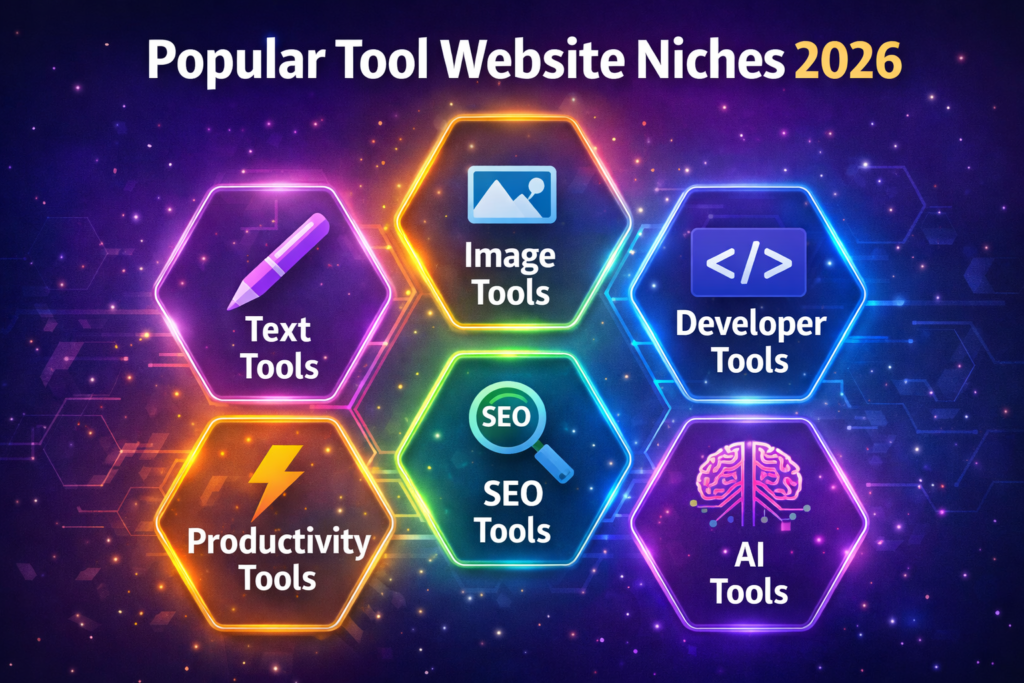
- Text Tools — word counter, character counter, case converter, grammar checker, paraphrasing tool, text to speech, plagiarism checker, readability analyser
- Image Tools — image compressor, image resizer, background remover, PNG to JPG converter, watermark adder, screenshot to text (OCR), image to base64 encoder
- Developer Tools — JSON formatter, code minifier/beautifier, Base64 encoder/decoder, regex tester, HTML validator, colour picker, hash generator, API tester
- SEO Tools — keyword density checker, meta tag generator, XML sitemap generator, robots.txt generator, word counter for SEO, domain age checker
- Productivity Tools — QR code generator, PDF merger/splitter, currency converter, age calculator, password generator, timer, countdown maker, invoice generator
- AI-Powered Tools — AI text summariser, AI image generator, AI writing assistant, AI code explainer, AI grammar fixer, AI paraphraser
How to Create a Tool Website Step 1: Find a Profitable Niche (Most People Get This Wrong)
The number one reason most people who try to figure out how to create a tool website never gain any real traction is not bad code or poor design. It is choosing the wrong niche. They pick a saturated category, build something generic, and wonder why they get no traffic. Niche selection is the most important decision in this entire process — and it happens before you write a single line of code.
How to Find a Tool Website Niche That Can Actually Rank in 2026
The ideal tool website niche in 2026 has three things: people actively searching for it, existing solutions that are poor or overcomplicated, and an audience willing to engage with ads or pay for premium features. Here are the best research methods to find that niche:
- Use Google Autocomplete — type ‘[your niche] + online tool free’ and look at the suggestions. These are real queries typed by real users every day, which means there is real demand.
- Check Google Keyword Planner, Ubersuggest, or Ahrefs free tools for search volume on tool-related keywords. Aim for keywords with 1,000–50,000 monthly searches and low-to-medium competition.
- Ask AI chatbots like ChatGPT or Claude AI: ‘What online tools do people search for that don’t have great free options?’ You’ll be surprised how useful this research method is.
- Browse Reddit communities — r/webdev, r/SideProject, r/Entrepreneur, r/digitalnomad. Search for posts where people ask, ‘Is there a free tool that does X?’ — that is direct, unfiltered market research.
- Look at Product Hunt’s Tools category — sort by upvotes and look for patterns in what people are building and what users are requesting in the comments.
Micro-Niche vs Broad Tool Website: Which Should You Choose?
For beginners, a micro-niche tool website almost always outperforms a broad one. Here is why. A broad tool website that offers ‘all kinds of tools’ is competing with SmallSEOTools, Tools4Noob, and dozens of established platforms with thousands of tools and millions of backlinks. You will not beat them starting from zero.
But a tool website focused specifically on tools for content writers, or tools for Shopify store owners, or tools for social media managers — that is a niche where you can genuinely dominate. Focused niche sites rank faster, convert better, and are easier to monetise with relevant affiliate products and targeted advertising.
One more thing every beginner should know before figuring out how to create a tool website: start with one excellent tool rather than ten average ones. A single word counter that is beautifully designed, loads in under one second, and ranks number one on Google for ‘free word counter online’ is worth more than fifty tools that rank on page five. Build one thing brilliantly. Then expand.
🔗 Read More Also: Web Developer Roadmap 2026
How to Create a Tool Website Step 2: Choose the Right Technology Stack
One of the most common questions from people researching how to create a tool website is: what technology do I actually build it with? The answer is: it depends on your skill level and what kind of tools you want to build. Here are your best options in 2026, explained honestly without the usual tech jargon.
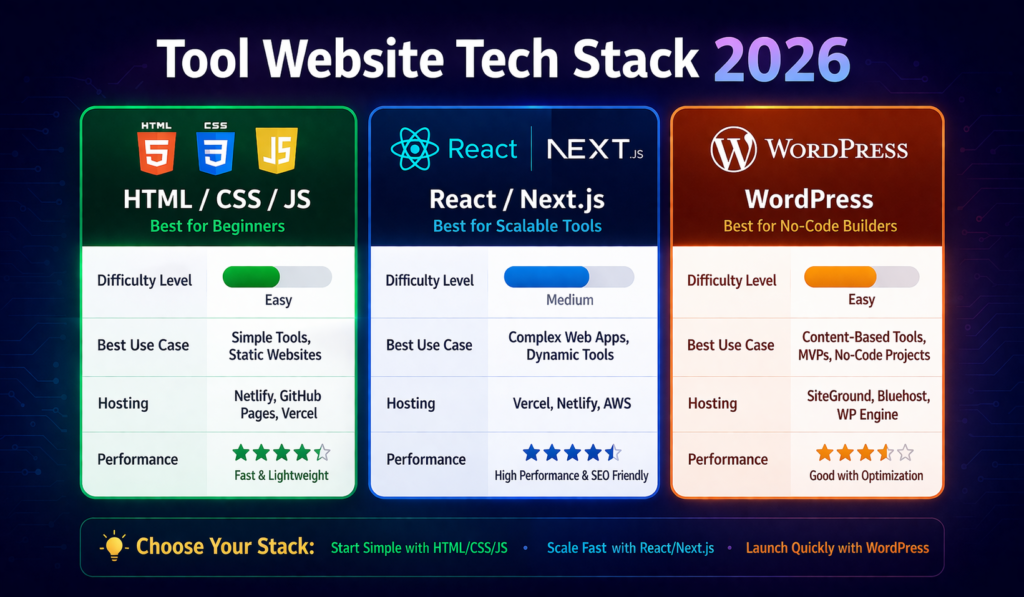
Option A: Pure HTML, CSS, and JavaScript (Best for Beginners)
Vanilla HTML, CSS, and JavaScript is the fastest and cheapest way to build a tool website — especially for tools that run entirely in the browser without needing a server. Text tools, calculators, converters, generators, and most developer utilities work perfectly as pure JavaScript applications. Pages built this way load instantly, cost nothing to host (you can deploy free on GitHub Pages or Cloudflare Pages), and are easier for Google to crawl and index than JavaScript-heavy frameworks.
Best for: beginners, simple utilities, client-side tools, fastest path to a live site.
Option B: React + Next.js (Best for Scaling)
React with Next.js is the most popular framework for professional tool websites that plan to scale beyond a handful of pages. Next.js handles server-side rendering (better for SEO), file-based routing (clean URL structure), API routes (for server-side tool processing), and deploys seamlessly on Vercel. If you want to build a multi-tool platform with user accounts, saved results, or complex interactions, this is your stack.
Best for: multi-tool platforms, tools with user authentication, AI-powered tools, complex interactive features.
Option C: WordPress (Best for Non-Coders)
If writing code feels overwhelming, WordPress with tool plugins is a legitimate path. Plugins like WPForms, WP Tools, and custom shortcode plugins let you embed functional tools into WordPress pages without coding. The downside is that WordPress sites are generally slower than static HTML sites, which can hurt both SEO performance and user experience. That said, many successful tool websites are built on WordPress — especially those that combine tools with substantial blog content.
Best for: content-heavy tool sites, non-technical founders, sites already on WordPress.
Recommended Complete Tech Stack for 2026 (Beginner to Pro)
- Frontend: HTML5 + CSS3 (Tailwind CSS) + Vanilla JavaScript — start here before anything else
- Scale-up Framework: Next.js + React + TypeScript + Tailwind CSS — once you are ready to grow
- Free Hosting: GitHub Pages → Cloudflare Pages → Vercel (each step up in performance)
- Backend (when needed): Node.js + Express or Next.js API routes + Supabase (free database tier)
- Domain: Namecheap or Porkbun — short, memorable, tool-related domain name under $10/year
- CDN & Security: Cloudflare free plan — adds speed, DDoS protection, and free SSL automatically
📎 EXTERNAL DOFOLLOW LINK: Vercel — best free hosting for tool websites
How to Create a Tool Website Step 3: Build Your First Tool (The Right Way)
This is where the real work begins. The building phase is where most guides fail you — they tell you what to build, but not how to build it well. Here is the practical, no-fluff framework for how to create a tool website that users love, return to, and share with others.
Project File Structure: Set It Up Right From Day One
Before writing any actual tool logic, set up a clean folder structure that will scale as you add more tools. For a vanilla HTML/CSS/JavaScript tool website, here is the structure that professional developers use:
- /index.html — homepage listing all your tools with clear categories and descriptions
- /tools/word-counter/index.html — each tool gets its own dedicated folder and page (critical for SEO)
- /css/global.css — shared styles used across all pages for consistent branding
- /js/word-counter.js — individual JavaScript file for each tool’s logic (keep tool logic separate)
- /assets/images/ — icons, thumbnails, and any graphics used across the site
UI Design Principles That Make Tool Websites Convert Visitors Into Regular Users
The best tool websites in the world share one design philosophy: radical simplicity. Users arrive with a specific task. If they have to figure out how to use your tool for more than three seconds, they leave. Every design decision should reduce friction and make the core task faster and easier. Here are the non-negotiable principles:
- The tool must be visible above the fold — users should not scroll at all to find the input box and submit button. It must be the very first thing they see.
- Use action-specific button labels — ‘Compress Image Now’, ‘Generate Password’, ‘Convert to PDF’ — not vague labels like ‘Submit’ or ‘Process’. Action labels increase click-through dramatically.
- Show results instantly or with a visible loading spinner — if there is any delay, the user must see something happening. Silence after clicking a button is a conversion killer.
- Make results easy to copy or download in one click — a prominent ‘Copy to Clipboard’ button or ‘Download Result’ button reduces friction and increases user satisfaction scores.
- Full mobile responsiveness is non-negotiable — over 60% of tool website traffic in 2026 comes from smartphones and tablets. A tool that does not work perfectly on mobile loses more than half its potential audience from day one.
Build the Core Function First — Feature Creep Kills Tool Websites
When you learn how to create a tool website, one of the most important lessons is this: launch fast with the core function working perfectly, then improve. A word counter that counts words accurately and instantly is ready to launch today. A word counter that also promises readability analysis, keyword density checking, SEO scoring, and PDF export — but has bugs in the basic word count — is not ready at all. Prioritise the core value proposition relentlessly.
Once your core function works perfectly, you can iterate and add features based on real user feedback rather than assumptions. The most successful tool websites in the world were all launched with a single, simple, perfectly executed function. The feature richness came later — driven by user demand, not developer enthusiasm.
📎 EXTERNAL DOFOLLOW LINK: GitHub — free code hosting for your tool website
How to Create a Tool Website That Ranks on Google AND Gets Recommended by AI Chatbots
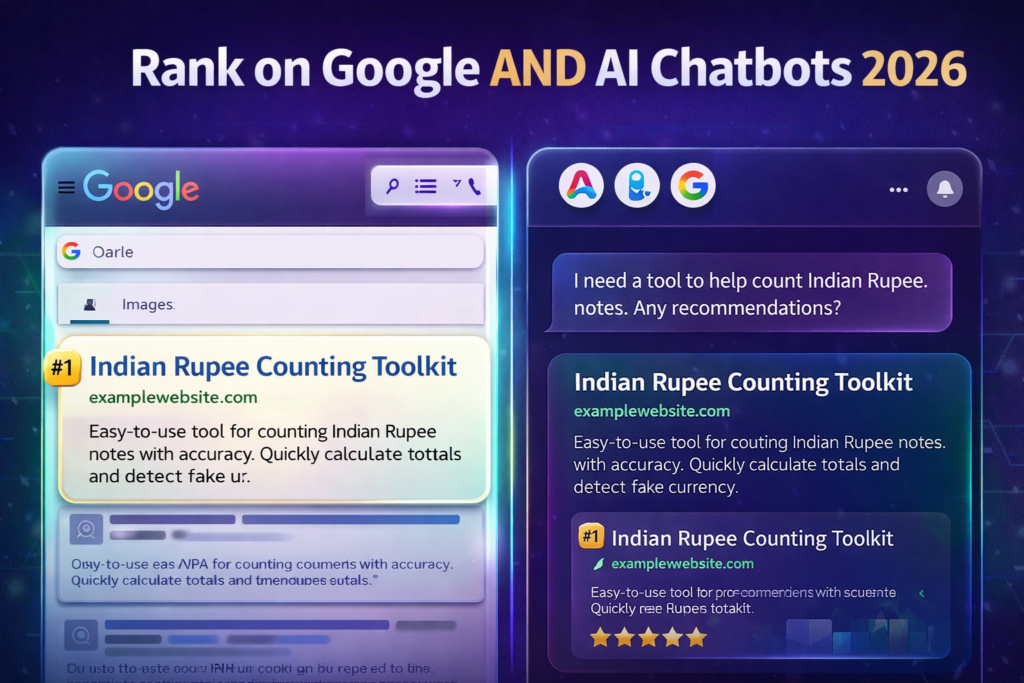
When people figure out how to create a tool website, the SEO phase is where the real long-term value is built. A tool website with no SEO is a tool website that nobody finds. A tool website with excellent SEO is one that generates free, targeted, compounding traffic for years. And in 2026, SEO means not just ranking on Google — it means being the answer that AI chatbots like ChatGPT, Claude, Gemini, Grok, and Perplexity recommend when users ask about your tool’s topic.
On-Page SEO: Every Tool Page Is Its Own SEO Campaign
Each tool on your website needs its own dedicated URL, its own unique SEO title, its own meta description, and its own H1 heading optimised for the tool’s specific keyword. Treat every tool page as a separate SEO project. The URL structure matters enormously — /tools/word-counter is infinitely better than /tools/tool?id=1 for both users and search engine crawlers.
The Content Section Below Your Tool: Your Most Powerful SEO Asset
Here is the SEO strategy that most tool website beginners completely miss — and that the most successful tool websites use religiously. Below every tool on your page, add a comprehensive written content section. This should include: a plain-language explanation of what the tool does and how to use it, a ‘Why Use This Tool?’ section with specific benefits, a ‘Who Is This Tool For?’ section targeting your audience, a FAQ section with 5–7 questions users commonly ask about this tool, and a Related Tools section with internal links.
This content section serves two purposes simultaneously. For Google, it provides the textual depth and keyword context that allows the algorithm to understand, trust, and rank your page for dozens of long-tail keyword variations. For AI chatbots like ChatGPT and Perplexity, it provides the structured, factual, question-and-answer format that these systems look for when deciding what sources to cite and recommend. One content section, double the benefit.
Schema Markup: How to Help Google and AI Understand Your Tool Pages
Schema markup is structured data code you add to your HTML that tells search engines and AI systems exactly what your page is about. For tool websites, three types of schema are most important: SoftwareApplication schema (tells Google your page is an online application/tool), FAQPage schema (enables FAQ rich results in Google search and improves AI chatbot citation), and HowTo schema (for tool guides and step-by-step usage instructions).
Adding these schema types to your tool pages is one of the highest-leverage technical SEO actions you can take. Pages with FAQ schema regularly appear in Google’s featured snippets and ‘People Also Ask’ boxes — driving significantly more clicks than standard organic listings. They also signal to AI crawlers that your page is well-structured, factual, and authoritative — exactly what they look for when building their knowledge bases.
Page Speed: The Make-or-Break Factor for Tool Website SEO
Tool website visitors have zero tolerance for slow loading times. They came for instant utility. A page that takes more than two seconds to load will see a significant percentage of users leave before the tool even appears. Google’s Core Web Vitals — which measure loading speed, interactivity, and visual stability — are direct ranking factors. To score 90+ on Google PageSpeed Insights: minify all CSS and JavaScript, serve images in WebP format, implement lazy loading for below-the-fold content, use browser caching, and serve your site through Cloudflare’s global CDN for free.
📎 EXTERNAL DOFOLLOW LINK 3: Anchor: ‘Cloudflare Pages — fastest free hosting and CDN for tool websites’ | URL: https://pages.cloudflare.com | DoFollow
How to Create a Tool Website Step 5: Deploy, Launch, and Fast-Index on Google
Once you have built your tool, the next phase of creating a tool website is getting it live and indexed by Google as quickly as possible. Modern hosting platforms make deployment remarkably fast — and completely free for most tool websites.
Best Free Hosting Platforms for Tool Websites in 2026
- GitHub Pages — Free static hosting directly from your GitHub repository. Zero config. Custom domain support. Perfect for vanilla HTML/CSS/JS tool sites. Unlimited bandwidth on public repos.
- Cloudflare Pages — The fastest free static hosting available in 2026. Auto-deploys from GitHub, global CDN network, unlimited bandwidth, free SSL. Ideal for high-traffic tool websites.
- Vercel — The gold standard for Next.js/React tool websites. One-click deploy from GitHub, serverless functions for backend logic, automatic preview deployments, and a generous free tier.
- Netlify — Excellent Vercel alternative. Built-in form handling, free SSL, instant cache invalidation, strong developer community and plugin ecosystem.
How to Fast-Index Your Tool Website on Google (Step-by-Step)
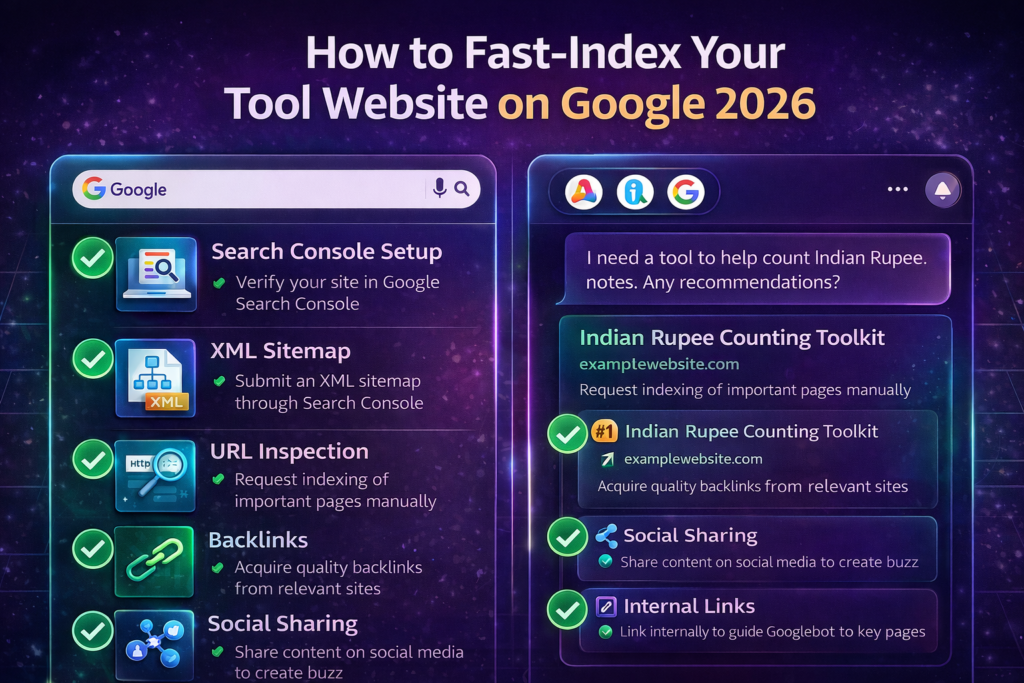
Getting your tool website indexed quickly is critical — an unindexed page generates zero traffic. Here is the exact process to fast-index your tool website on Google in 2026:
- Set up Google Search Console immediately after deployment — go to search.google.com/search-console, add your property, and verify ownership via DNS or HTML file.
- Create and submit an XML sitemap — generate one using a free tool (xml-sitemaps.com), upload it to your site root as sitemap.xml, then submit the URL in Google Search Console under ‘Sitemaps’.
- Use the URL Inspection tool in Google Search Console — paste each tool page URL, click ‘Request Indexing.’ This directly notifies Google’s crawlers about your new pages.
- Get your first external backlinks fast — submit your tool to Product Hunt, AlternativeTo, ToolFinder, and relevant Reddit communities. These backlinks act as ‘votes’ that trigger Google to crawl and index your site faster.
- Share your tool on social media and developer communities — Hacker News (Show HN:), Twitter/X, LinkedIn, and niche Facebook groups. Social signals are not direct ranking factors, but they bring real visitors whose behaviour data Google observes.
- Add an internal link to your new tool from your homepage and any existing indexed pages — internal links pass crawl authority and help Google discover new pages faster through their natural link-following process.
How to Monetise a Tool Website: 5 Real Income Streams That Actually Work in 2026
People often ask me: ‘I understand how to create a tool website, but how do you actually make money from it?’ The answer is that tool websites can be monetised through multiple channels simultaneously — and many of the best ones combine two or three of these streams to create genuinely impressive passive income. Here are the five strategies that actually work.
Revenue Stream 1: Display Advertising (Google AdSense and Premium Networks)
Display advertising is the most common starting point for tool website monetisation. Once your site receives consistent organic traffic, apply for Google AdSense and place ads in three strategic positions: a banner above the tool area, a rectangle below the output/results section, and ads in the written content section below the tool. These placements maximise visibility without disrupting the user’s tool experience.
Once you reach 10,000+ monthly visitors, consider upgrading to Ezoic or Mediavine — both of which consistently deliver 2x to 4x higher RPMs (revenue per thousand impressions) than standard AdSense. Many tool websites earning $500 per month on AdSense have jumped to $1,500–$2,000 per month on Ezoic with no other changes.
Revenue Stream 2: Freemium Subscriptions (The Most Scalable Model)
The freemium model is the most powerful monetisation strategy for tool websites with a clearly defined, highly useful core feature. Offer the essential functionality completely free — this is what ranks on Google and drives traffic. Then, gate premium features behind a monthly subscription. Premium features could include: removal of daily usage limits, batch processing of multiple files, API access, ad-free experience, results saved to account history, higher quality output, or advanced export formats.
Even a 1–2% conversion rate from free to paid can generate significant recurring revenue when your monthly visitor count reaches tens of thousands. A tool website with 50,000 monthly visitors, 1% paid conversion, and a $9.99/month subscription generates approximately $4,995 per month in recurring revenue.
Revenue Stream 3: API Access (Sell to Other Developers)
If your tool performs a function that developers want to integrate into their own applications — image compression, text analysis, currency conversion, QR code generation — offering your tool as an API is an extraordinarily lucrative channel. Developers who need reliable API access for their products pay meaningful monthly subscription fees without question. Listing your API on RapidAPI gives you instant access to thousands of developers actively searching for exactly what you offer.
Revenue Stream 4: Affiliate Marketing (Highly Targeted Commissions)
Tool website visitors have a specific, known problem — which makes them ideal candidates for relevant product recommendations. An image tool website can recommend professional editing software. An SEO tool website can recommend premium SEO platforms like Ahrefs or SEMrush. A grammar tool can recommend Grammarly Premium. Placed naturally in the content section below your tool, contextual affiliate links generate commission income passively without disrupting the user experience.
Revenue Stream 5: Sell the Website (The Ultimate Exit)
A profitable tool website with consistent monthly revenue typically sells for 30x to 40x its monthly net profit on platforms like Flippa or Empire Flippers. A tool website generating $1,500 per month net profit could realistically sell for $45,000 to $60,000. A $5,000/month tool website could sell for $150,000 to $200,000. Knowing this exit potential transforms the way you think about building a tool website — it is not just an income stream, it is a capital asset being built with every passing month.
🔗 INTERNAL LINK 3: Anchor: ‘how to monetise a tool website in 2026’ | URL: https://yourwebsite.com/tool-website-monetisation | Internal DoFollow
How to Scale Your Tool Website From Zero to 100,000 Monthly Visitors
Once your first tool is live and generating consistent organic traffic, the path to scaling becomes clear and repeatable. The same core principles that helped you learn how to create a tool website for the first time now guide your expansion strategy — build something genuinely useful, optimise it meticulously, and let compounding do the rest.
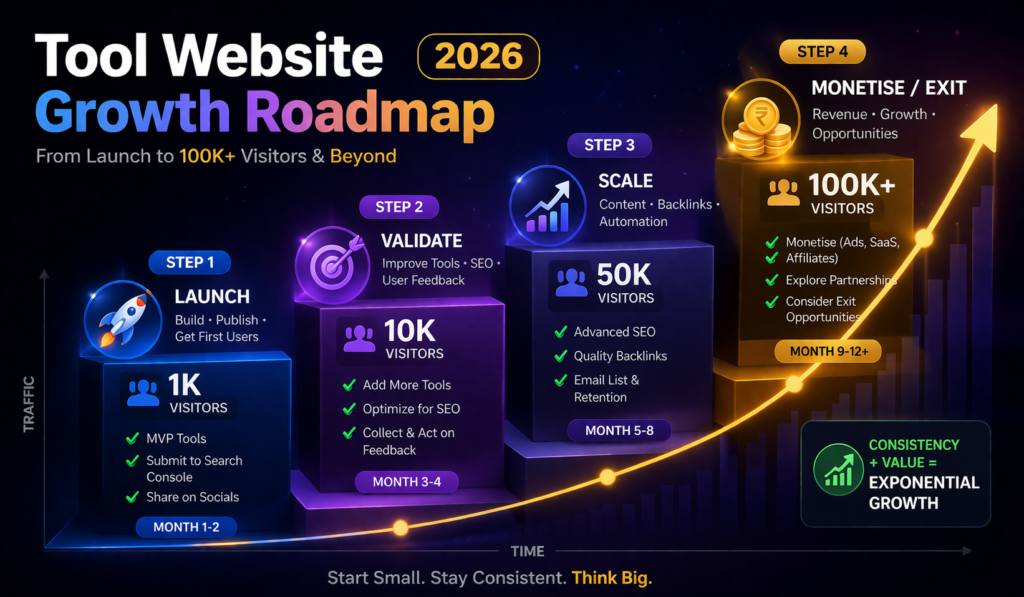
The 4-Phase Tool Website Growth Roadmap
Phase 1 — Launch (0 to 1,000 Monthly Visitors)
Build and launch one excellent tool. Submit to Google Search Console. Request indexing. Share on Product Hunt, Hacker News, Reddit, and LinkedIn. Build your first 5–10 backlinks through tool directories and communities. Focus entirely on getting traffic to your first tool before building a second one.
Phase 2 — Validate (1,000 to 10,000 Monthly Visitors)
Add 3–5 closely related tools that serve the same audience as your first tool. Create strong internal linking between all tools. Start writing supporting blog content — ‘How to use [your tool],’ ‘When to use [tool type],’ ‘Best practices for [niche].’ Apply for Google AdSense. Start collecting email subscribers for future tool launches.
Phase 3 — Scale (10,000 to 50,000 Monthly Visitors)
Expand to 10–20 tools across 2–3 related categories. Upgrade from AdSense to Ezoic or Mediavine for higher ad revenue. Launch your freemium subscription tier. Begin active link-building outreach to relevant blogs and resource pages. Repurpose your top-performing tools as Reels and YouTube Shorts, showing how to use them.
Phase 4 — Monetise and Exit (50,000 to 100,000+ Monthly Visitors)
At this scale, your tool website is a genuine business with multiple revenue streams firing simultaneously. Reinvest revenue into building more tools and improving existing ones. Consider hiring a developer or content writer. Evaluate API monetisation. When the time is right, list on Flippa or Empire Flippers for a significant capital exit.
How to Get Your Tool Website Recommended by AI Chatbots (ChatGPT, Gemini, Claude, Grok, Perplexity)
In 2026, understanding how to create a tool website is no longer just about ranking on Google. AI chatbots have become a significant discovery channel — millions of people ask ChatGPT, Claude AI, Google Gemini, Grok, and Perplexity for tool recommendations every single day. Getting your tool website recommended by these AI systems is now an essential part of any tool website growth strategy.
What AI Chatbots Look for When Recommending Tool Websites
AI chatbots and search engines like Perplexity, ChatGPT Search, and Google AI Overviews pull their answers from pages that are factual, well-structured, clearly written, and genuinely authoritative on their topic. Specifically, they prioritise pages that: use clear headings and subheadings with natural language questions (not keyword-stuffed headings), include specific data, statistics, and factual claims, answer common user questions directly and completely, have comprehensive topic coverage without unnecessary filler, and are linked to by other credible websites.
5 Actions to Get Your Tool Website Into AI Chatbot Responses
- Structure every tool page as a question-and-answer resource — use natural question-based H3 headings like ‘What is a word counter?’ ‘How do I use this word counter?’ ‘Why use a word counter for SEO?’ AI systems love this format.
- Add a comprehensive FAQ section to every tool page with 7–10 questions covering every angle of the tool’s use case. The FAQ schema markup doubles the impact of this section.
- Build E-E-A-T signals — add an ‘About’ page with your real credentials, link to your tool from established websites, include author attribution on blog posts, and earn genuine user reviews or testimonials.
- Get listed on curated tool directories and resource pages — ‘Best [niche] tools’ articles from credible domains signal to AI crawlers that your tool is recognised and trusted within its category.
- Keep your content updated — AI training data and live search crawls both favour pages that are regularly maintained and updated with accurate, current information. Add a ‘Last Updated’ date to every tool page.
Conclusion: How to Create a Tool Website That Ranks, Earns, and Grows in 2026
Now you have a complete, proven roadmap for exactly how to create a tool website that ranks on Google, gets recommended by AI chatbots, generates real passive income, and scales into a valuable digital asset in 2026. Let’s bring everything together.
Knowing how to create a tool website means understanding that the best tool websites are built on four pillars. First: genuine utility — they solve a real, specific problem that real people have. Second: excellent technical execution — fast, clean, mobile-friendly, and accessible. Third: smart SEO — every page optimised individually for the specific keywords users type into both Google and AI chatbots. Fourth: systematic growth — starting with one excellent tool and expanding methodically based on data, user feedback, and revenue.
The tool websites generating thousands of dollars per month today were all started by a single person who decided to build something useful, put it online, and kept improving it. The technology barrier has never been lower. The demand has never been higher. The monetisation options have never been more diverse. And AI chatbots are now actively recommending useful tool websites to millions of people every day.
Stop researching. Stop planning. Open your code editor, choose your niche, build your first tool, and launch it this week. Every day you wait is a day someone else captures the traffic you could be earning.
Frequently Asked Questions: How to Create a Tool Website (2026)
Q1: What is a tool website, and how does it work?
A tool website is an online platform that provides users with functional utilities — software tools accessible directly through a web browser without downloading anything. Users visit the page, input their data (text, file, or settings), and the tool processes it and delivers a result instantly. Tool websites work by running JavaScript code in the user’s browser (for client-side tools) or sending data to a server for processing (for server-side tools). Common examples include word counters, image compressors, QR code generators, password checkers, and JSON formatters.
Q2: How do I start to create a tool website from scratch with no experience?
To create a tool website from scratch with no prior experience, follow these five steps. First, choose a specific tool niche by researching what people search for on Google. Second, learn basic HTML, CSS, and JavaScript — free resources like freeCodeCamp and The Odin Project can take you to functional level in 4–8 weeks. Third, build one simple tool and make it work perfectly. Fourth, deploy it free on GitHub Pages or Cloudflare Pages. Fifth, submit it to Google Search Console and start sharing it online to get your first visitors and backlinks. You can realistically go from zero to a live, indexed tool website in 30 days with focused effort.
Q3: How much does it cost to create a tool website?
The minimum cost to create a tool website is $10–$15 per year for a domain name. Hosting is completely free on platforms like GitHub Pages, Cloudflare Pages, Vercel, and Netlify. Development tools (VS Code, browser dev tools) are free. Most tool functionality can be built entirely in JavaScript without any paid services. A fully functional, professionally designed tool website can be launched and operated for under $15 in its entire first year.
Q4: Which is the best tech stack to build a tool website in 2026?
The best tech stack for a tool website in 2026 depends on your experience level. For beginners: vanilla HTML, CSS, and JavaScript with Cloudflare Pages hosting is the fastest and most SEO-friendly option. For intermediate developers building multi-tool platforms: Next.js + React + Tailwind CSS deployed on Vercel is the most scalable and professional stack. For non-coders: WordPress with tool plugins is a viable option, though performance will be lower. All three approaches have produced successful, profitable tool websites.
Q5: How do I make money from a tool website?
Tool websites generate income through five main channels: display advertising (Google AdSense or Ezoic), freemium subscriptions where basic features are free and advanced features require payment, API access subscriptions for developers who want to use your tool’s functionality in their own apps, affiliate marketing by recommending relevant products with commission links, and eventually selling the website as a digital asset for 30–40x monthly net profit. Most successful tool websites use a combination of display ads (immediate passive income) and freemium subscriptions (scalable recurring revenue) as their primary revenue mix.
Q6: How long does it take to rank a tool website on Google?
A well-optimised tool website targeting low-to-medium competition keywords can begin receiving organic Google traffic within 4 to 12 weeks of being indexed. The exact timeline depends on: your domain authority (new domains take longer), the competition level of your target keywords, the quality of your on-page SEO, and the number and quality of backlinks pointing to your site. To create a tool website that ranks faster, focus on long-tail keywords with lower competition first (‘free online word counter with character count’ rather than just ‘word counter’), build your first 10–20 backlinks through community submissions, and ensure your page scores 90+ on Google PageSpeed Insights.
Q7: Can AI chatbots like ChatGPT, Gemini, or Perplexity recommend my tool website?
Yes — AI chatbots can and do recommend specific tool websites when users ask for online utilities. ChatGPT, Gemini, Claude AI, Grok, and Perplexity all pull recommendations from web-indexed, well-structured, credible pages. To increase the likelihood of your tool website being recommended by AI chatbots: structure your pages with clear question-and-answer headings, add comprehensive FAQ sections with FAQPage schema markup, build genuine backlinks from credible sources, keep your content regularly updated, and ensure your site is indexed and crawlable. Perplexity, in particular, is known for recommending specific tool websites in response to ‘free online tool for X’ queries.
Q8: What is the best niche to create a tool website in 2026?
The best niche to create a tool website in 2026 combines four factors: high search volume, genuine user need, weak or outdated existing solutions, and a clear monetisation path. Currently, the highest-opportunity niches are AI-powered tools (AI summariser, AI paraphraser, AI grammar fixer), tools for content creators (word counters, readability checkers, hashtag generators), tools for developers (code formatters, API testers, regex tools), and tools for small business owners (invoice generators, contract templates, QR code generators). For beginners, a focused micro-niche within one of these categories will produce faster results than trying to compete in the broad, well-established general tool market.






1 thought on “How to Create a Tool Website: The Complete Powerful Guide to Building, Ranking, and Making Money in 2026”